
Use Gumroad's native analytics to understand your own sales. Use a market research tool to compare competing offers. Search trends and SEO tools answer different questions again: interest and discoverability, rather than product revenue.
If you already sell a digital product, choose the next tool around a decision: pricing a new tier, finding comparable offers, or identifying a traffic source worth testing. Buying seven dashboards will not make that decision for you.
Disclosure: InsightRaider publishes this guide and sells one of the products below. This is a comparison of documented capabilities, not an independent hands-on benchmark of all seven tools. We do not assign performance scores without a reproducible test protocol.
The seven tools cover different jobs, not seven interchangeable Gumroad integrations. EverBee is included for sellers investigating Etsy as a second channel. This is a task-oriented shortlist, not an exhaustive software directory.
Choose by the question you need answered
| Tool | Useful question | Evidence it provides | What it does not establish |
|---|---|---|---|
| InsightRaider | Which Gumroad offers should I compare with mine? | Public product signals and modeled revenue estimates | Audited competitor revenue or profit |
| Gumroad analytics | Which of my products and sources generated sales? | First-party store sales and referrer reporting | Competitor sales |
| Google Trends | Is search interest changing? | Relative search-interest trends | Sales volume or willingness to pay |
| EverBee | Which Etsy listings merit closer inspection? | Etsy product and keyword research | Gumroad product performance |
| Exploding Topics | Which emerging topics should I investigate? | Topic and trend discovery | Demand for a particular paid offer |
| Similarweb | How do competing websites attract visitors? | Website traffic and channel estimates | A Gumroad product's actual earnings |
| Ahrefs | Which searches could bring qualified visitors? | Keywords, search results and SEO metrics | Checkout conversion or product revenue |
Start with the row that matches your decision. A tool can be useful without answering every question in this table.
1. InsightRaider: compare offers using public market signals
InsightRaider is useful when an existing seller wants to compare product positioning, price and estimated traction. Its public reports provide examples; paid access supports broader product research.
Use the estimates to shortlist competitors, then open the original product pages and inspect what is actually included. Two products in the same category may serve different buyers, include different licenses or sell on different billing periods.
A calculation you can reproduce
Our archived example for contains a listed price of $129, a 15,093 sales proxy, and modeled revenue of $1,946,997:
$129 × 15,093 = $1,946,997.
This reproduces the stored estimate; it does not verify the seller's earnings. The archive date is March 17, 2026. The original collection date and revenue period are not recorded, so this is neither a current monthly revenue figure nor evidence of recent growth. Historical discounts, price changes, bundles and refunds can make actual revenue different.
Compare it with the public product examples and read the estimation methodology. Before changing your own pricing, compare the buyer, scope and included support—not just the largest estimate.
Walk through a public report: three software offers
We reviewed three vendor pages on September 21, 2026 to work through a decision for a seller who already offers a Mac battery utility. This is a public-report research walkthrough, not a recording of the paid dashboard or a customer success story.
- Open the Software Development examples. The first three stored entries are Dracula PRO, BatFi and Vivid. A shared category is a starting point, not proof that all three compete with your offer.
- Follow the vendor sources. describes charging controls for compatible Macs. addresses display brightness and offers device-based licenses. packages themes and related resources for editors and terminals.
- Assign a role to each offer. For the battery-utility scenario, keep BatFi for a feature and compatibility comparison. Use Vivid as a licensing reference. Exclude Dracula PRO from the price benchmark: its buyer problem is different.
- Choose a test you can run. Compare your supported hardware, setup and charge controls with BatFi. Test one message about a verified difference in your own product. Measure your own purchases and support questions before changing the price.
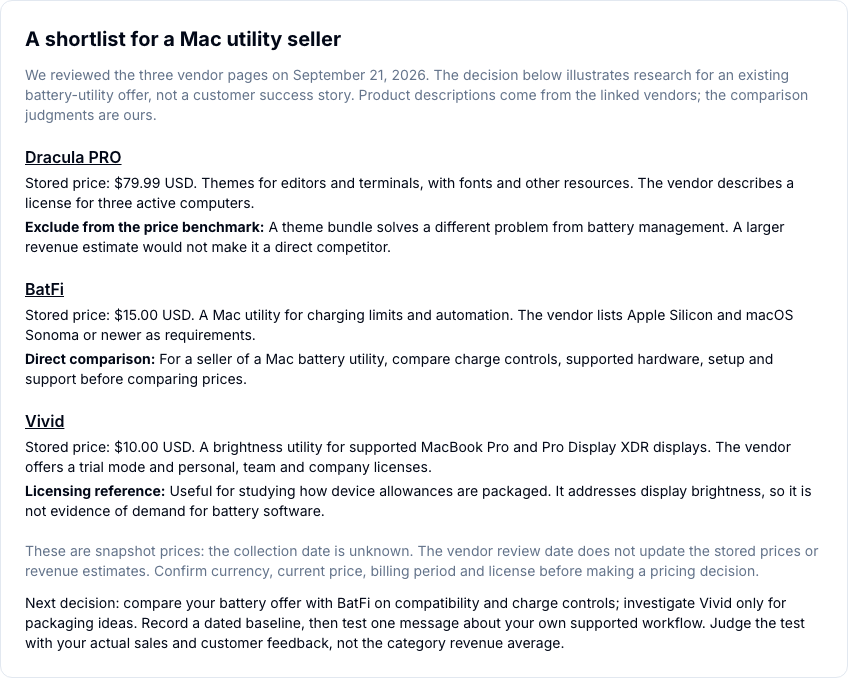
Capture prepared from the public report build on September 21, 2026. The report shows stored prices of $79.99, $15 and $10 USD. Their collection date is unknown; the vendor review does not refresh them. Check current currency, price and license on the linked vendor pages.
What to check the following week
Save a dated baseline for the offers you keep: source URL, price and currency, billing period, supported hardware and included support. At the next review, compare those same fields. Investigate an observed change before acting; a changed estimate alone does not establish new sales.
The March public snapshot cannot demonstrate weekly momentum. For ongoing research in the paid product, inspect the available observation dates and coverage for your shortlist. If a comparable period is missing, do not report a growth rate. Use your own sales and customer feedback to evaluate the decision.
A real follow-up: what changed for BatFi?
We extracted these three stored observations from InsightRaider's product history on September 23, 2026. They concern the same BatFi listing used in the walkthrough above.
| Observation date (UTC) | Recorded review count | Recorded average rating |
|---|---|---|
| September 12, 2026 | 335 | 4.7 |
| September 17, 2026 | 337 | 4.7 |
| September 20, 2026 | 337 | 4.7 |
The price field was also unchanged across these checks. Download the dated observations and their limitations.
What could a seller do with this? Keep the comparison on the watchlist and investigate a relevant change in compatibility, licensing or positioning before reacting on price. Two more reviews do not prove two more sales.
This is real product history, not a customer result. It shows the difference between a one-time shortlist and returning to the same evidence over time. Coverage varies by product, so check the dates available for your market first.
Turn the comparison into one decision
If you have a live offer, write down the decision before opening another report. For the battery-utility scenario, it could be: “Should I change my price, or explain compatibility more clearly?”
| Decision | Evidence to look for | Your next action |
|---|---|---|
| Keep the offer | The alternatives solve a different problem, or no relevant change is observed | Keep your price and record what would justify reconsidering it |
| Clarify the offer | Your product has a verified difference that its page does not explain | Update one compatibility, license or support statement; check buyer questions |
| Test a price or tier | Comparable scope and license, a viable margin, and a question your own sales can answer | Test one change and record visits, orders, net proceeds and refunds |
A weekly review is useful when a change could affect a decision you actually make. A new competitor price may justify investigation; it does not prove you should match it. If no comparable offer or dated observations are available for your market, an estimate cannot fill that gap.
In the paid product, select the market around your existing offer, inspect three relevant products and watch a product to establish a dated baseline. At your next review, check which observations are available and what changed since tracking began. The reason to return is to revisit a decision with new evidence, not to treat every movement as a sales signal.
Price: dashboard access is $49/month or $490/year, with a 30-day money-back guarantee on the first payment. Public reports remain accessible without a subscription. Review the current offer and access conditions.
Next step: . Create an account, then choose a paid plan to access the dashboard.
2. Gumroad analytics: investigate your own sales first
Gumroad's reports your own product sales and how buyers found you. It is the starting point when the question is “which product or source generated my sales?”
If sales declined, compare the same periods and products before blaming a market trend. A change in visits, conversion, discounts or refunds requires a different response. Reconcile payout questions against the sales export and Payments view, not a competitor estimate.
For additional funnel measurement, Gumroad documents a . Its collection conditions and your setup affect what is observed. Your store's records and your analytics reports need not have identical totals.
3. Google Trends: check direction, not revenue
normalizes search interest on a 0–100 scale. It does not report the number of customers buying a product.
Compare related terms using the same geography and period. Inspect whether the interest is seasonal and whether the query implies a paid solution. A rising search for free templates may have little bearing on a premium template bundle.
Use this as supporting context for your research, then validate the actual offer with your own audience.
4. EverBee: investigate Etsy when Etsy is the market
provides Etsy product research and keyword insights. It is relevant if you maintain an Etsy catalog or want to investigate that channel.
Keep marketplace assumptions separate. Evidence about an Etsy listing does not establish performance on Gumroad, and a similar title does not make the customer or acquisition cost equivalent. See our Etsy and Gumroad comparison for the fee questions to check.
Before choosing a research tool, use our Gumroad vs Etsy decision guide for digital products to compare marketplace discovery, direct sales and the fees on the same order value.
5. Exploding Topics: build a topic shortlist
helps discover topics to investigate. It is useful before detailed product research, particularly when you want to find adjacent problems your existing customers may be starting to discuss.
Treat a trend as a research lead. Before building, inspect existing offers, interview relevant buyers and identify the problem someone would pay you to solve. Popularity alone does not supply a distribution channel.
6. Similarweb: inspect website acquisition
covers traffic and engagement at website level. That can help you form hypotheses about a competitor's acquisition mix.
Keep the unit of analysis clear. Traffic to a domain or storefront is not the same as sales of a particular download. Check that the report has usable coverage for the website you want to study before paying for access.
7. Ahrefs: assess the search route to your offer
supports keyword and search-result research. Use it when your decision concerns content, search demand or competition for a query.
Inspect the result pages, not just estimated volume. A query returning tutorials may call for a guide; a query returning comparison pages may indicate a buyer choosing between options. Neither automatically predicts the conversion rate of your product.
What to buy—and what to leave until later
Keep first-party sales reporting as your baseline. Add market research when you have a specific positioning or pricing decision. Add SEO or traffic research when you have a channel hypothesis you can act on.
For third-party subscriptions, verify current pricing, billing period, export limits and coverage on the provider's site. The cheapest plan may not include the capability you need. This guide deliberately avoids presenting unverified subscription prices as current quotes.
Frequently asked questions
Can an external tool show exact Gumroad competitor revenue?
Public signals can support estimates. They do not grant access to private sales records, discounts, refunds or profit. Keep the distinction visible when making or sharing a comparison.
Which tool should an existing Gumroad seller start with?
Use Gumroad analytics for your own sales question. If the next decision is about competing offers, compare market signals and original product pages. Add a search or trend tool only when it answers a separate question.
Does a high revenue estimate prove a good niche for me?
No. It may reflect a long sales history, an established audience or a different offer. Compare the customer problem and acquisition route, then test your own offer with real buyers.
Capability sources reviewed September 21, 2026. The worked product example retains its separate March archive date; this editorial review does not refresh the underlying product data.