Start competitor analysis with one decision about your existing offer, then compare three products your buyer could actually choose instead. Record the evidence, choose a change you can test and revisit the comparison when new observations are available.
A category leaderboard is a place to find candidates. It does not tell you whether their customers, licenses, acquisition channels or support needs match yours. A product with a large revenue estimate may be a poor reference for your own pricing.
This guide turns that research into a five-step workflow. Disclosure: InsightRaider publishes this guide and sells market research software.
1. Define the decision and select comparable offers
Write a question narrow enough to change what you do this week. For example: “Should I keep the price of my Mac battery utility, or explain its compatibility more clearly?”
Look for products serving the same buyer and problem. Start with three relevant offers when available; do not force a three-product comparison if the market contains only one close alternative.
Assign each candidate a role:
- Direct alternative: solves a similar problem for a similar buyer. Compare scope before price.
- Adjacent reference: offers a useful idea about licensing, onboarding or support, while solving a different problem.
- Exclude: shares a category or keyword but does not help answer the decision.
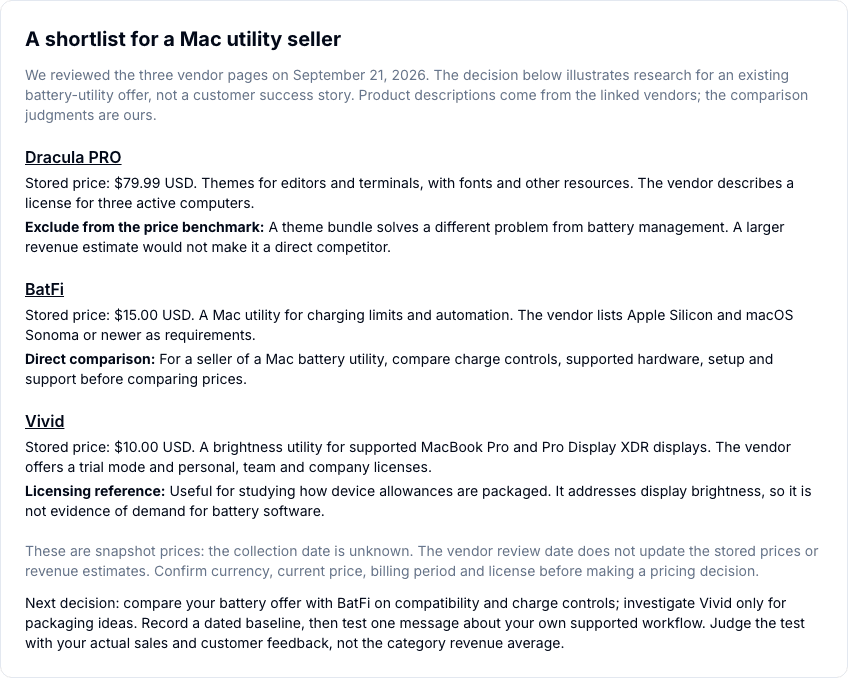
The public software walkthrough applies this to BatFi, Vivid and Dracula PRO. For the battery-utility scenario, BatFi is the feature comparison, Vivid is a licensing reference and Dracula PRO is excluded from the price benchmark. Those roles are our judgment, based on vendor pages reviewed on September 21, 2026.
The illustration above comes from that public report. Its stored prices are archived, not live.
2. Record what the buyer actually receives
For each retained offer, open the original listing and keep a dated record. Separate what you can observe from what you are inferring.
| Field | What to record | Why it matters |
|---|---|---|
| Buyer and problem | Intended user and task | Similar names can conceal different customer needs |
| Deliverables | Files, software, lessons, community or service | A download and supported service carry different obligations |
| Price | Amount, currency, billing period and visible promotion | Monthly and one-time prices are not interchangeable |
| License | Personal, commercial, team or device restrictions | Scope can explain a price difference |
| Support and updates | Stated duration, compatibility and service commitments | These affect what you must deliver and what it costs |
| Evidence | Source URL, observation date and missing fields | A later comparison needs a traceable baseline |
A higher competing price does not establish that your buyers will pay more. A missing feature does not establish demand for it. Check your own buyer conversations and support requests before treating either as an opportunity.
For price examples and a fee-based floor, use the Gumroad product pricing guide. Its observed listings are examples, not market-wide recommended prices.
3. Investigate acquisition and customer language
Inspect the visible path from discovery to purchase: search result, social post, listing, checkout and any publicly described onboarding. Record the offer's message and how it explains the outcome.
Keep channel claims bounded. A creator's active newsletter establishes that they publish a newsletter; it does not reveal which sales it generated. Website traffic estimates cannot identify the private conversion rate of a particular product. Use your own analytics to test your acquisition hypothesis.
Read relevant public reviews in context. Note the product version, reviewer use case and date when available. Distinguish a repeated problem from one isolated complaint. Reviews can suggest questions to ask your customers; they do not measure the share of the whole market experiencing that problem.
If buyers repeatedly ask whether your product works with their setup, first check whether your listing answers that question accurately. Adding a clear compatibility statement may be the appropriate test before changing the product or its price.
4. Choose one action and its measure
Bring the research back to the original decision. A compact decision note is more useful than an expanding collection of unrelated competitors.
| Action | When it is a reasonable hypothesis | How to evaluate it |
|---|---|---|
| Keep | No relevant difference or change is supported by the evidence | Record what observation would cause you to reconsider |
| Clarify | A real capability, license or support condition is unclear on your page | Change one statement; review buyer questions and the observed purchase journey |
| Test a price or tier | Scope is comparable and the proposed price covers your obligations | Record visits, orders, net proceeds, refunds and support load |
A test note should state the old offer, the proposed change, the start date and the outcome you will inspect. Record promotions and traffic-source changes. If several things change together, an improvement does not isolate the effect of price.
With few purchases, use customer feedback and the observed journey to understand problems while accumulating evidence. A week with more orders is not automatically a statistically reliable win.
5. Revisit the same offers with dated evidence
Keep the shortlist stable long enough to compare it. At your next review, check the same price, scope, license and support fields. Add or remove an offer when its relevance changes, and record why.
A price change is observable; its reason may not be. An increased modeled revenue amount does not establish new sales. Inspect observation periods and the estimation method and limits before using a trend.
End each review with a decision: keep the current offer, investigate a new difference or run one test. If no change is observed, record that result rather than inventing a reason to act.
Where InsightRaider fits
Use your own sales reporting for actual performance. Use market research to find comparable offers and monitor the public signals around them. The analytics and research tools comparison explains the distinction and shows the existing public example.
In InsightRaider's paid product, select your market, inspect relevant products and watch a product to establish a dated baseline. Check the available observation dates and coverage before treating a movement as meaningful. The historical public archive does not supply a weekly time series or validate the accuracy of the paid product's estimates.
Dashboard access is $49/month or $490/year, with a 30-day money-back guarantee on the first payment. Review the offer and access conditions, then . Account creation leads to a paid plan; the public walkthrough remains available to read first.
Updated September 23, 2026 to replace unsupported performance claims with a reproducible decision workflow. Vendor review date for the linked example: September 21, 2026. Its stored product prices have not been refreshed by this editorial update.