Whop Analytics: Track Your Sales, Members & Revenue Growth
Whop is built for memberships, communities, and recurring digital products.
Picture a familiar scenario: a creator celebrates hitting $1K/month, posts the revenue screenshot on Twitter, and never looks at why they hit that number. Next month, revenue drops to $600. They have no idea what changed because they were staring at the rearview mirror instead of watching the road.
Your Whop dashboard isn't a trophy case. It's an X-ray machine. This guide teaches you how to read it and, more importantly, what to do when the numbers point to a specific problem.
Your Dashboard: What Each Number Actually Means
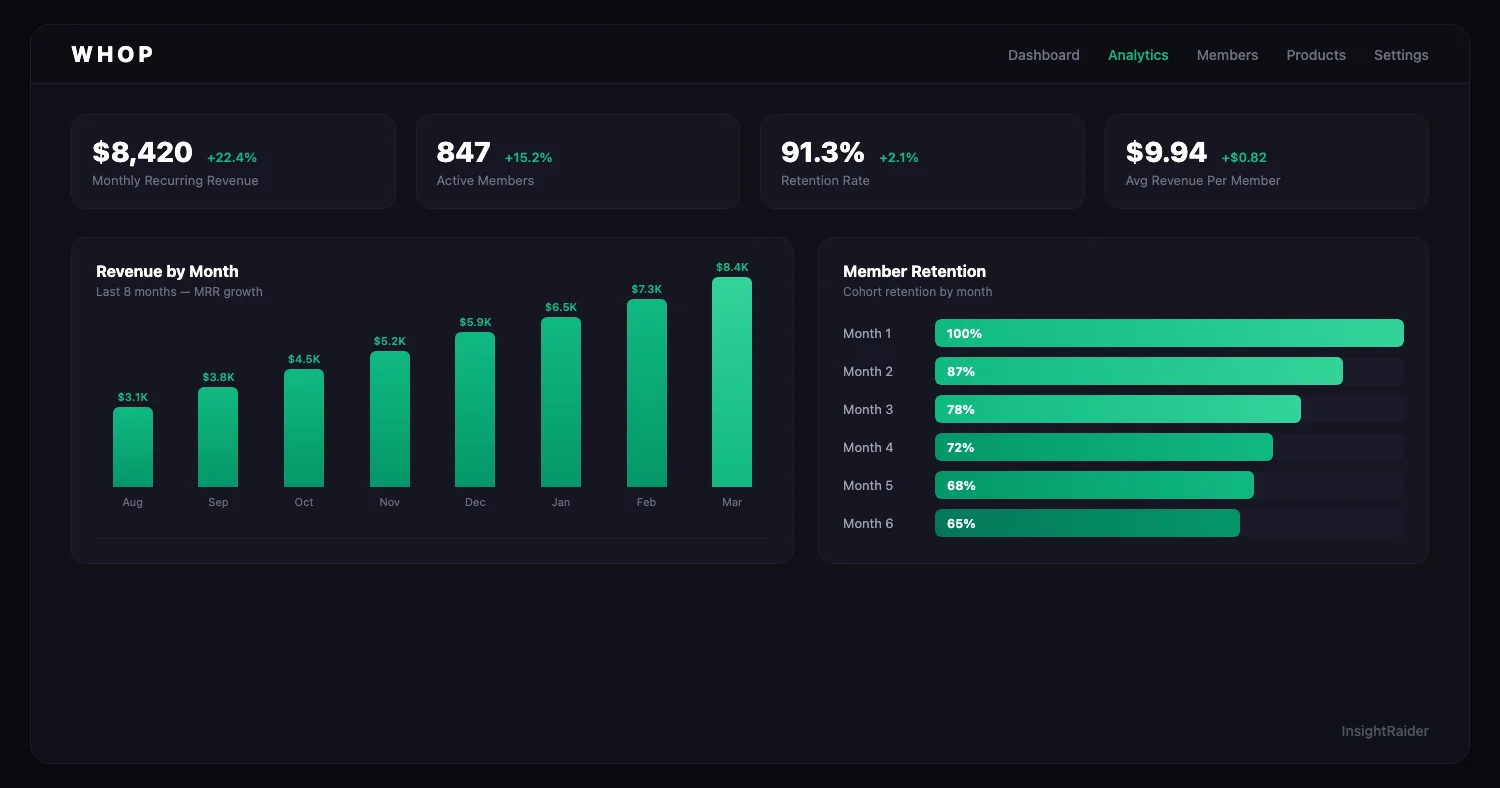
When you open your Whop seller dashboard, you see the big picture first.
| Metric | What It Measures | What It Actually Tells You |
|---|---|---|
| Total revenue | Gross earnings in selected period | The headline -- but misleading on its own |
| Active members | Current paying subscribers | Your real business health |
| New members | Signups in the period | Growth velocity |
| Churned members | Cancellations in the period | Your biggest revenue leak |
| Net revenue | Revenue after fees and refunds | What you actually keep |
The number most sellers ignore: Churned members. If 100 people join and 80 cancel, you didn't grow by 100 -- you grew by 20. Net growth (new minus churned) is the only number that matters for memberships.
For a membership, how long people stay matters as much as how many sign up.
The Diagnostic Framework: Find Your Leak
Instead of guessing what to improve, start by identifying your biggest problem. Your Whop analytics will point to one of four diagnoses. Read through each one and find which matches your data.
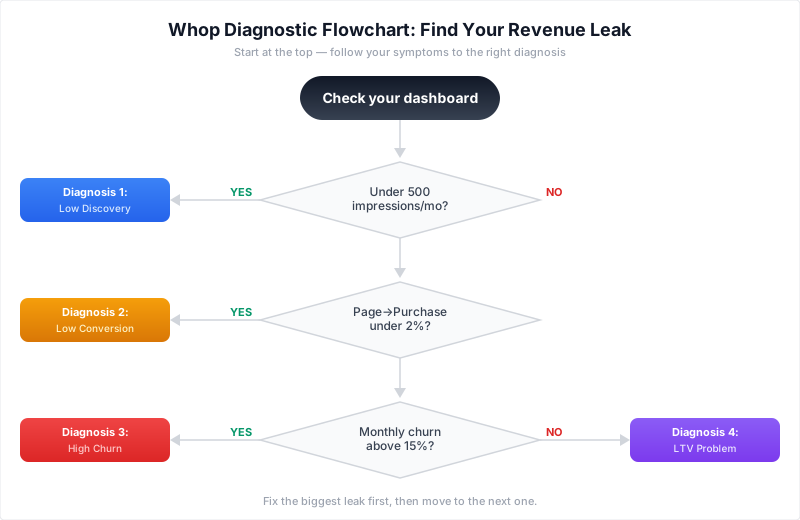
The cut-offs in the flowchart (500 impressions, 2% purchase rate, 15% churn) are illustrative triage thresholds, not industry benchmarks. Replace them with your own history before deciding which leak to fix.
Diagnosis 1: "People aren't finding me" (Low Impressions)
Symptoms: Few monthly impressions on the Whop marketplace. Few clicks. Revenue limited by traffic, not conversion.
What your dashboard shows: Low impression count, but click-to-page-view and page-view-to-purchase rates might actually be decent. The funnel works; not enough people enter it.
The Whop conversion funnel, for reference:
| Stage | What It Measures |
|---|---|
| Impressions | Times your product appeared in search/browse |
| Clicks | Times someone clicked your listing |
| Page views | Times someone viewed your full product page |
| Purchases | Times someone bought |
What to fix:
-
Optimize your listing for Whop's discovery algorithm. Whop doesn't publish its ranking formula, so treat these as plausible factors to work on, not confirmed signals:
- Sales velocity -- recent sales momentum matters more than lifetime total
- Rating quality -- deliver value, follow up with new members to encourage ratings
- Conversion rate -- a listing that converts well gets shown more
- Recency -- products updated recently tend to rank better
- Completeness -- fill out every field, add all images, write a full description
-
Title and category matter. Choose your Whop category carefully. Being a solid product in a high-traffic category beats being the best product in a dead one. For InsightRaider's modeled revenue estimates by category, see our profitable niches analysis.
-
Drive external traffic. The marketplace is one channel, not your only channel. Twitter/X, YouTube, and Reddit are common places to build initial momentum.
Diagnosis 2: "People find me but don't buy" (Low Conversion)
Symptoms: Decent impressions and page views, but a low page-view-to-purchase rate compared with your own previous months.
Compare each step of the funnel (impression → click → page view → purchase) with your own history. A generic industry range can't tell you why your listing underperforms; the step where your rate dropped can.
What to fix:
-
Your product images. Whop's marketplace is visual-first. Your card competes with dozens of others. If your thumbnail looks like it was made in 5 minutes, buyers scroll past. A designer is often a better investment than another week of tweaking it yourself.
-
Your description. Write a complete description. Include: what the member gets, who it's for, what results to expect, FAQ, and social proof. A buyer who can't find the answer on the page usually doesn't ask; they leave.
-
Your pricing structure. Try 2-3 tiers instead of a single price (example prices):
- Basic: Core access ($19/month)
- Pro: Core + extras ($39/month)
- Premium: Everything + 1-on-1 access ($99/month)
Tiers let buyers choose their level of commitment, and give committed members a way to pay more.
-
Your refund policy. State it clearly on your product page. The trust signal can outweigh the occasional refund cost; check your own refund rate after the change.
For a deeper comparison of how product presentation affects revenue across marketplaces, see our Gumroad vs Whop comparison. Systeme.io sellers: see our workflow-based analytics guide for a funnel-focused approach.
Diagnosis 3: "People buy but leave fast" (High Churn)
Symptoms: High monthly churn. Members join, stay 1-2 months, cancel.
This is the most expensive problem on Whop because you're paying for acquisition (time, content, ads) and losing the return before it materializes.
What churn means in months: average member lifespan is roughly 1 / monthly churn. That's arithmetic, not a benchmark:
| Monthly Churn | Avg Member Lifespan |
|---|---|
| 5% | About 20 months |
| 10% | About 10 months |
| 20% | About 5 months |
What to fix, by churn timing:
If members leave in the first week: Your onboarding is the problem. They signed up, didn't find immediate value, and bounced. Send a welcome sequence in the first 48 hours that shows members exactly how to get value. Pin the "start here" content. Make the first win achievable in 10 minutes.
If members leave at 30-60 days: Your ongoing content isn't delivering enough. Add weekly touchpoints: live calls, new content drops, community challenges. Create "sticky" features: templates, tools, or integrations that members build workflows around.
If members leave at 3-6 months: They've gotten what they came for and don't see what's next. You need an upgrade path: a premium tier, a coaching add-on, or a "year 2" curriculum. Without a reason to stay, even satisfied members leave.
Retention Curves: What Good vs. Bad Looks Like
Whop shows you how many members remain active over time.
A healthy curve flattens out (hypothetical illustration, not a benchmark):
- Month 1: 100%
- Month 2: 75-85% (some early churn is normal)
- Month 3: 65-75%
- Month 6: 50-60%
- Month 12: 40-50%
A bad curve drops off a cliff (hypothetical illustration):
- Month 1: 100%
- Month 2: 50%
- Month 3: 30%
- Month 6: 10%
If your curve drops steeply in month 2, fix onboarding before spending another dollar on acquisition.
Diagnosis 4: "Revenue is growing but profit isn't" (LTV Problem)
Symptoms: Active members growing, but revenue per member declining or acquisition cost rising.
The core metric: Lifetime Value (LTV)
LTV = Average monthly price / Monthly churn rate
This is the most important number in your Whop business. It tells you how much you can afford to spend acquiring each new member.
| Monthly Price | 5% Churn (LTV) | 10% Churn (LTV) | 20% Churn (LTV) |
|---|---|---|---|
| $19/mo | $380 | $190 | $95 |
| $29/mo | $580 | $290 | $145 |
| $49/mo | $980 | $490 | $245 |
| $99/mo | $1,980 | $990 | $495 |
The difference between 5% and 20% churn on a $49/month product is $735 in lifetime value per member. That's why retention work can pay off more than spending more on ads.
What to fix:
-
If LTV is low compared with what a member costs you to acquire: Your price is too low, your churn is too high, or both. Raising price from $19 to $29 with the same churn increases LTV by 52%.
-
If acquisition cost exceeds LTV: You're losing money on every new member. Cut paid acquisition, focus on organic channels (content, referrals, community), and fix churn first.
-
If revenue per member is declining: Add upsells: premium tiers, add-ons, 1-on-1 services. Or raise prices for new members while grandfathering existing ones.
Revenue Tracking: Gross vs. Net
Whop charges no platform fee, but payment processing applies to each transaction (2.7% + $0.30 for domestic cards per ), plus any optional services and payout fees. Always make business decisions based on net revenue (what you actually receive after fees and refunds).
Track monthly:
| Metric | How to Calculate | What to Target |
|---|---|---|
| Net MRR | Sum of active subscription revenue after fees | Growing month-over-month |
| Revenue per member | Net MRR / active members | Stable or increasing |
| One-time vs. recurring split | Recurring / total revenue | Growing recurring share |
If one-time sales bring in most of your revenue, you're dependent on constant new member acquisition. Shift toward memberships and subscriptions.
Refund Tracking
Track your refund rate: Refunds / Total transactions x 100
Watch the trend month over month rather than a fixed threshold. A rising refund rate usually means your sales page overpromises. A rate that stays high points to a product-market fit issue: your page sells something your product doesn't deliver.
Whop Marketplace SEO: Optimizing Your Listing
Whop's built-in marketplace is a distribution channel worth optimizing. Here's how to think about listing optimization.
Your title is the most important element. It should include the primary keyword buyers search for, be specific about what they get, and be under 60 characters. "Discord Trading Alerts + AI Analysis" beats "Premium Trading Community."
Your category determines which browse pages you appear on. Pick the category that best matches buyer intent, not the one with the fewest competitors. High-traffic categories drive more impressions even if competition is stiffer.
Your tags help Whop's search surface your product for related queries. Use 5-8 tags that match how your target buyer would search. Think like a buyer: "crypto signals," "trading alerts," "discord group" -- not "premium," "best," "quality."
Your pricing display matters for marketplace browsing. If you offer a free trial or a low entry tier, that price shows up in browse results. A "$0 free trial" or "$9/month" listing can attract more clicks than "$99/month" in a marketplace context, even if your average revenue per member is higher on the premium tiers.
Update frequency signals activity. Regular updates (new descriptions, new images, new tiers) may help a listing keep its marketplace visibility; at minimum, they show buyers the product is alive.
The Weekly Review (15 Minutes Every Monday)
- Net MRR -- up, flat, or down from last week?
- New members vs. churned -- what's your net growth?
- Conversion rate -- any changes in marketplace performance?
- Revenue per member -- stable or declining?
- Which diagnosis fits? -- Low discovery? Low conversion? High churn? LTV problem?
Pick the one metric that needs the most improvement. Focus your week on that. Don't try to fix everything simultaneously -- fix the biggest leak first, then move to the next one.
Whop shows you your performance. InsightRaider shows you the market: modeled revenue estimates, pricing patterns and competition signals for 500K+ products across Gumroad, Whop and Skool, so you can compare your Whop offer with similar ones. Explore the data.
Got more questions? Check out our data-driven answers:
More comparisons: Whop vs Lemon Squeezy · Whop vs Systeme.io